Is Nuclino the Right Wiki for Your Team? Consider Selfhosting Instead
Nuclino has built a solid reputation as a clean, fast wiki tool for teams that want to stop losing information in scattered Google Docs and Slack threads. And honestly, that reputation is well earned. The editor feels snappy, the interface stays out of your way, and getting new team members onboard takes minutes.
But here's the thing. Nuclino works great until it doesn't. And for a growing number of teams, the cracks start showing once you move past the basics and start asking harder questions about data ownership, deployment flexibility, and long-term cost.
If you've been evaluating Nuclino and feel like something is missing, you're not alone. Let's dig into where Nuclino shines, where it falls short, and why selfhosting your wiki with a tool like Docmost might be the smarter path forward.
What Nuclino Gets Right
Credit where it's due. Nuclino nails the onboarding experience. You sign up, invite your team, and start writing. The real-time collaboration works smoothly, the search is fast, and the visual organization options (list view, board view, graph view) give teams genuine flexibility in how they structure their knowledge base.
For small teams of five to fifteen people who just need a shared space to document processes and meeting notes, Nuclino checks most of the boxes. The free plan lets you create up to 50 documents, and the paid plans start at a reasonable price per user per month. It integrates with Slack, Google Drive, and a handful of other popular tools. It just works.
The problem is that "just works" has boundaries, and many teams hit those boundaries faster than they expect.
Where Nuclino Starts to Fall Short
The first friction point for most teams is data control. Nuclino is a cloud-only platform. Your documentation, your internal processes, your sensitive company knowledge, it all lives on Nuclino's servers. For plenty of small startups and creative agencies, that's perfectly fine. But for teams in healthcare, finance, government, defense, or any industry with strict compliance requirements, cloud-only is a dealbreaker.
There's no option to selfhost Nuclino. You can't run it on your own infrastructure. You can't deploy it behind your company firewall. You can't operate it in an air-gapped environment. If regulations require you to keep data on premises, Nuclino simply isn't an option, no matter how good the editor feels.
The second issue is scalability and feature depth. Nuclino intentionally keeps things simple, and that simplicity is both its greatest strength and its most significant limitation. As your team grows beyond a few dozen people, you start needing more granular permissions, proper SSO integration (hi group sync) with your identity provider, SCIM, and the ability to search inside attached files. Nuclino's permission system works at a basic level, but it doesn't offer the kind of fine-grained access control that larger organizations need.
Finally, there's vendor dependency. Nuclino is a relatively small company. That's not a criticism of their work, but it's a practical consideration. If Nuclino changes its pricing, alters its terms of service, or (in a worst-case scenario) shuts down, your team's entire knowledge base is at risk. You can export your data, sure, but migrating hundreds or thousands of documents to a new platform is never as smooth as anyone promises.
Why Selfhosting Your Wiki Matters
The shift toward selfhosted software isn't just a trend driven by privacy-conscious developers. It's a practical response to real problems that teams face with cloud-only tools.
When you selfhost your wiki, your data stays on servers you control. That might be your company's own hardware, a private cloud instance, or a virtual machine in a data center you've chosen. The point is that you decide where the data lives, who can access it, and how it's protected.
For organizations that need to comply with GDPR, ITAR, FedRAMP, or internal data governance policies, selfhosting isn't a nice-to-have. It's a requirement. And even for teams that aren't bound by specific regulations, there's real peace of mind in knowing that your documentation won't disappear because a SaaS vendor changed direction.
Enter Docmost: A Modern Enterprise Selfhosted Wiki Built for Teams
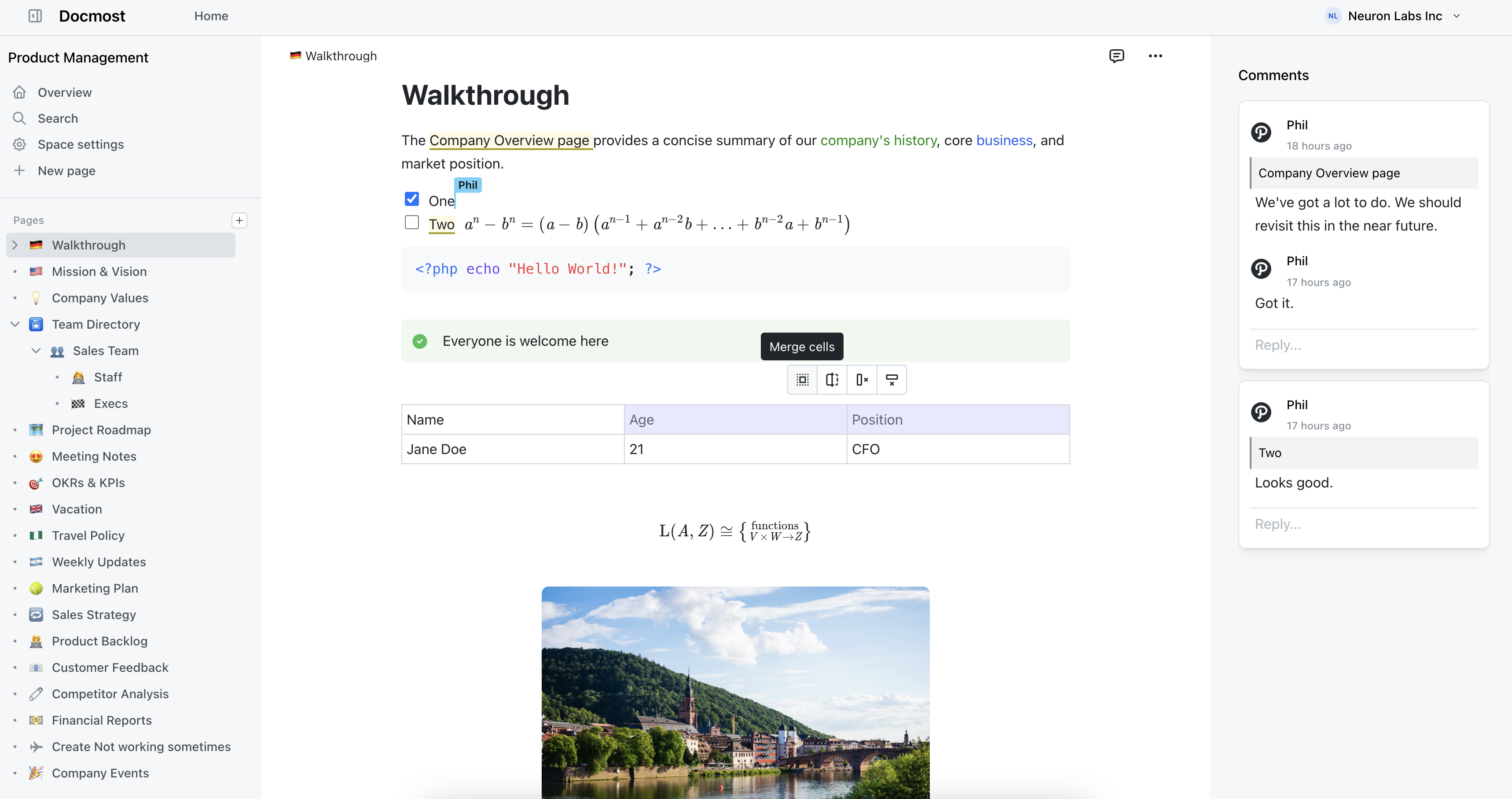
Docmost is an enterprise-ready selfhosted wiki and documentation platform that was built to give teams the same polished experience they expect from cloud tools like Nuclino, Confluence or Notion, without forcing them to hand over control of their data.
At its core, Docmost offers real-time collaborative editing that feels really smooth. Multiple people can work on the same page simultaneously without overwriting each other's changes. The editor supports rich text formatting, tables, code blocks, callouts, LaTeX for math equations and embedded content. If you've used Nuclino's editor and liked it, you'll feel right at home with Docmost.
Spaces let you organize content by team, project, or department, each with its own permission settings. This means your engineering team's documentation stays separate from HR's onboarding guides, with clear boundaries around who can view and edit what. Groups make managing permissions across large teams practical rather than tedious.
Diagram support is built directly into the editor. Docmost integrates with Draw.io, Excalidraw, and Mermaid, so your team can create flowcharts, architecture diagrams, and UML diagrams without leaving the wiki. This is a meaningful advantage for technical teams who document systems and processes visually.
The inline commenting system lets team members have discussions right where the content lives, rather than bouncing between the wiki and a chat tool to ask questions or suggest changes.
And because Docmost is selfhosted, you deploy it on your own infrastructure using Docker. The setup is straightforward, and once it's running, you own it completely.
Truly Enterprise-ready
For larger organizations, Docmost offers an Enterprise Edition that adds the features bigger teams actually need. SSO support through SAML 2.0, OpenID Connect, and LDAP means your team authenticates through your existing identity provider. Multi-factor authentication adds another layer of security. Audit logs give you visibility into who did what and when. Full-text search extends into attached PDFs and DOCX files, so knowledge doesn't get buried in attachments that nobody can find.
There's even a Confluence importer for teams migrating away from Atlassian, which is particularly relevant now that Atlassian has announced the retirement of Confluence Data Center. If your organization has been using Confluence on premises and needs a new home for that documentation, Docmost offers a direct migration path.
Teams at organizations like Airbus, the Australian Government, the German Red Cross, and the University of Bern already use Docmost to manage their knowledge. That's not a list of early-stage beta testers. These are large institutions with serious requirements around security, compliance, and reliability.
Making the Switch
If you're currently using Nuclino and considering a move, the transition doesn't have to be painful. Docmost supports Markdown import, which means you can export your Nuclino content and bring it into Docmost without starting from scratch.
The real question isn't whether Nuclino is a bad tool. It's whether Nuclino is the right tool for where your team is headed. If you're a small team with no compliance requirements, Nuclino will serve you well. It's a good product.
But if you value data ownership, need to meet regulatory requirements, want to avoid vendor lock-in, or simply prefer the economics of selfhosted software, Docmost deserves a serious look. It gives you the modern, collaborative wiki experience your team expects, with the control and flexibility that cloud-only tools can't offer.